


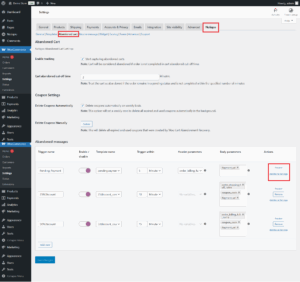
The Abandoned Cart feature in Notiqoo is designed to boost sales by sending personalized WhatsApp template messages with coupon offers to customers who didn’t complete their checkout. With flexible triggers based on minutes, hours, or days, Notiqoo gives you full control over your abandonment cart recovery strategy. You can also customize which WooCommerce order statuses should be treated as “abandoned” and define a cut-off time to trigger messages.
What Is an Abandoned Cart?
An abandoned cart happens when a customer adds items to their cart but leaves the store without completing the order. Notiqoo uses this behavior to automatically launch abandonment cart recovery reminders that bring shoppers back to complete the purchase.
In Notiqoo, WooCommerce orders with Pending Payment status are considered abandoned once they pass the defined cut-off time. You can also add more WooCommerce statuses using this filter:
add_filters('woom_abandonment_status', ['your_desired_statuses']);
This helps fine-tune your abandonment cart recovery workflow.
Abandoned Cart Settings in Notiqoo
1. Enable Tracking
Enable this option to start tracking abandoned carts. When turned on, Notiqoo begins monitoring carts and identifying them as abandoned based on the set cut-off time. This is the first step in building a powerful abandonment cart recovery system.
2. Cart Abandoned Cut-off Time
This is the waiting period before Notiqoo marks an order as abandoned.
Example: If set to 20 minutes, then any cart without action after 20 minutes will be flagged for abandonment cart recovery.
3. Delete Coupons Automatically
To keep the system clean, Notiqoo can automatically delete expired or used coupons on a weekly basis. This ensures your abandonment cart recovery coupons remain organized and relevant.
4. Delete Old Coupons Manually
You can also delete expired or used coupons manually using the Delete button. This provides full control over coupon management within your abandonment cart recovery process.
Abandoned Messages — The Core of Abandonment Cart Recovery
This table lists all abandonment triggers you have set. Each row represents a recovery action, such as reminders, payment links, or discount messages.
Trigger Name & Template Name
- Trigger Name: Type of recovery message (e.g., reminder-message, payment-link).
- Template Name: WhatsApp message template used for that specific trigger.
These work together to shape your abandonment cart recovery communication.
Timing
Set the exact timing for each recovery message—minutes, hours, or days after the cart is abandoned.
Example:
Send the first payment-link message 5 minutes after abandonment.
Optimizing message timing is key to improving your abandonment cart recovery rate.
Header & Body Parameters
Parameters allow dynamic data insertion such as customer name, cart link, product names, and discounts.
If you need to create custom parameters, refer to the guide here: Add Custom Parameters on Notiqoo Templates.
Using the right parameters boosts personalization—and improves abandonment cart recovery conversions.
Additional Template Settings
Create Coupons
You can automatically generate discount coupons for abandoned carts to improve conversions. Settings include:
- Discount type
- Coupon amount
- Validity period (e.g., 3 months)
- Individual-use restriction
Discount-based incentives significantly increase abandonment cart recovery performance.
Preview Messages & Extra Settings
Preview each message before sending to ensure it fits your recovery strategy. Extra settings help customize message behavior for optimal abandonment cart recovery.Add New Triggers
Use the Add New button to create additional abandonment triggers for more advanced workflows—such as multi-step reminders or follow-ups.
Save Changes
Once everything is set, click Save Changes to activate your abandonment cart recovery system.
Adding Additional Statuses for Abandonment Cart Recovery
You can expand which WooCommerce order statuses are treated as abandoned using the woom_abandonment_status filter:
$statuses = apply_filters('woom_abandonment_status', ['your-statuses']);
By default, pending is already included.
To add the failed status:
add_filter('woom_abandonment_status', function ($statuses) {

$statuses[] = 'failed'; // Add 'failed' status

return $statuses;

});
This ensures both pending and failed orders are included in your abandonment cart recovery workflow.