
WhatsApp Flow for Hotels & Resorts: Create Seamless Guest Experiences with Notiqoo
Running a hotel or resort means you need fast responses, smooth enquiry management, and personalized guest experiences even before check-in. With Notiqoo’s WhatsApp Flow for Hotels, you can automate and streamline your entire guest journey — all inside WhatsApp.
This powerful feature transforms WhatsApp into a virtual concierge that works 24/7, making guest interactions simple, guided, and fully automated.
What Is a WhatsApp Flow?
A WhatsApp Flow is an interactive, customizable experience inside WhatsApp, created using the WhatsApp Business Platform. It uses:
- Automated messages
- Interactive buttons
- Selectable lists
- Custom forms
Together, these elements allow you to build guided workflows for enquiries, bookings, services, and feedback — without guests ever leaving WhatsApp.
When combined with WooCommerce bookings through Notiqoo, you get a complete WhatsApp booking system tailored for hospitality.
Why Use WhatsApp Flow for Hotels?
If your hotel or resort uses WooCommerce-based booking systems, Notiqoo helps you offer a simple, automated, and fast communication experience. With deep integration and WhatsApp automation for hotels, you can:
1. Offer Smooth Booking Assistance
Guide guests through rooms, packages, and availability with interactive steps.
2. Collect Food & Dining Preferences
Understand dietary needs before check-in and prepare meals in advance.
3. Personalize Guest Experiences
Capture stay duration, occasion type, or special requests.
4. Manage Reservations
Allow guests to confirm, modify, or upgrade bookings directly via WhatsApp.
5. Capture New Leads
Collect enquiry details for follow-ups and targeted promotions.
WhatsApp Flow for Hotels makes your communication interactive instead of one-way — creating engagement and trust.
How a Hotel Can Use WhatsApp Flows
Step 1: Create an “Enquiry & Booking” Flow
Design a WhatsApp Flow that greets visitors and helps them get what they need quickly.
Example Welcome Flow:
👋 Hello! Welcome to Sunview Resort. How can we help you today?
- Room Availability Enquiry
- Book a Room
- Check Amenities
If the user selects Book a Room, show options like:
- Deluxe Room
- Family Suite
- Honeymoon Villa
Then, display pricing, package details, and WooCommerce booking links — all through WhatsApp flow for WooCommerce.
Step 2: Collect Guest Details & Preferences
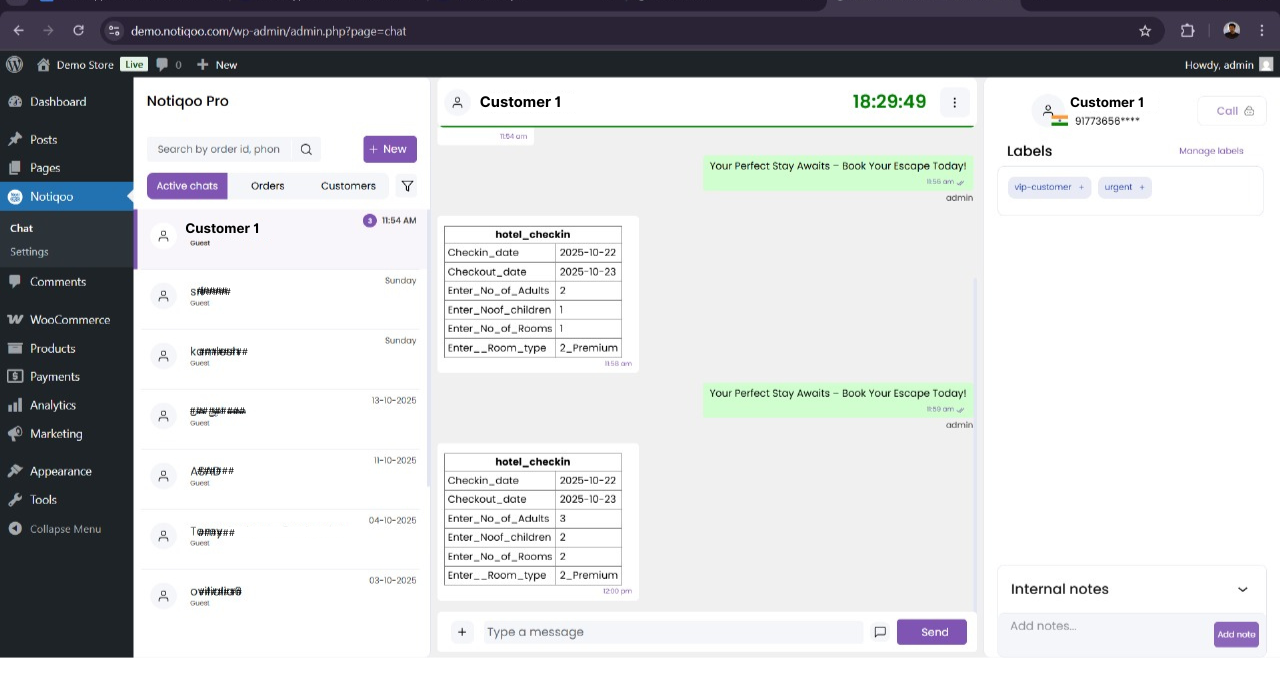
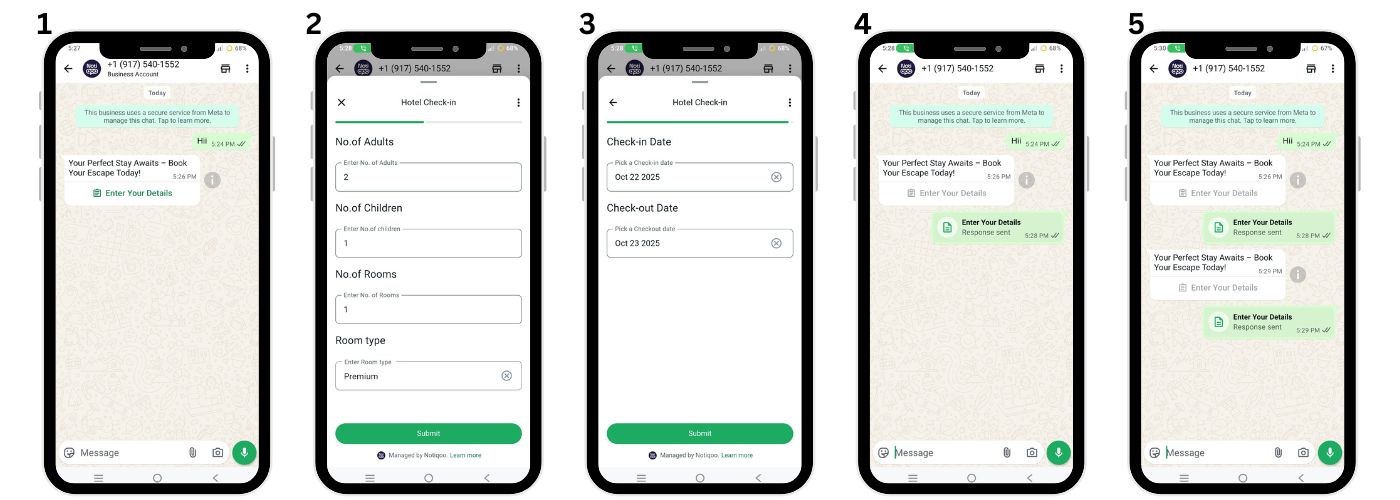
Use forms inside the flow to collect:
- Name
- Contact number
- Check-in & check-out dates
- Number of guests
- Preferred room type
- Budget
Notiqoo saves this data automatically, enabling better follow-ups and personalized offers.
Step 3: Gather Food & Dining Preferences Before Arrival
Once a booking is confirmed, send a pre-check-in WhatsApp Flow:
“Hi {{name}}, welcome to Sunview Resort! Tell us your dining preferences to make your stay more comfortable.”
Options like:
- Vegetarian
- Non-Vegetarian
- Vegan
- Jain Meals
Plus optional questions:
- “Would you like to pre-book breakfast or meals?”
- “Any food allergies?”
This ensures a smooth, personalized hospitality experience.
Step 4: Manage Guest Services Effortlessly
You can also automate guest service requests:
- Book airport pickup/drop
- Schedule a spa appointment
- Request housekeeping
- Ask for amenities
- Share feedback after checkout
With WhatsApp automation for hotels, staff can respond faster while reducing manual work.
How to Set Up WhatsApp Flows in Notiqoo
Setting up a WhatsApp Flow inside Notiqoo is simple:
Step 1: Create the Flow in Meta’s Flow Builder
Design messages, lists, steps, and forms. Copy the JSON code generated.
Step 2: Add the Flow in WhatsApp Manager
Go to Meta Business Manager → WhatsApp Manager → Message Flows → Create New → Paste JSON → Publish.
Step 3: Convert the Flow Into a WhatsApp Template
Create a “Flow” type template and submit for approval.
Step 4: Sync & Send via Notiqoo
In the Notiqoo Dashboard:
- Go to Settings → Template Settings
- Sync templates
- Open a chat and send the flow to guests
This turns WhatsApp into your hotel’s complete WhatsApp booking system.
Benefits of Using Notiqoo for Hotel WhatsApp Flows
- Faster Enquiry Handling
- Personalized Guest Experiences
- Pre-Check-In Coordination
- Reduced Manual Work
- WooCommerce Integration with WhatsApp Flows
Notiqoo makes your hotel’s WhatsApp communication efficient, organized, and customer-friendly.
Boost Automation With Notiqoo Automator (Add-On)
Upgrade to Notiqoo Pro and enhance it further using Notiqoo Automator, the powerful automation add-on.
With Automator, your hotel can:
- Auto-respond to enquiries
- Send instant booking confirmations
- Automate reminders and follow-ups
- Trigger flows based on booking events
Together, Notiqoo + Notiqoo Automator provide the most complete WhatsApp automation for hotels using the official WhatsApp Cloud API.
Final Thoughts
With WhatsApp Flow for Hotels, you can completely transform how guests interact with your property — from enquiry to checkout.
Notiqoo helps you:
- Automate bookings
- Personalize guest experiences
- Reduce manual tasks
- Improve customer satisfaction
Whether you run a hotel, resort, villa, or homestay, WhatsApp Flows make your guest communication modern, fast, and highly efficient.