
This section shows all the default WhatsApp templates that Notiqoo automatically creates for different features—such as product reviews, photo reviews, OTP, contact form replies, and other automations.
You don’t need to create these templates manually. Notiqoo creates them for you, so you don’t have to worry about how it works.These templates must be active for all related features to work properly.
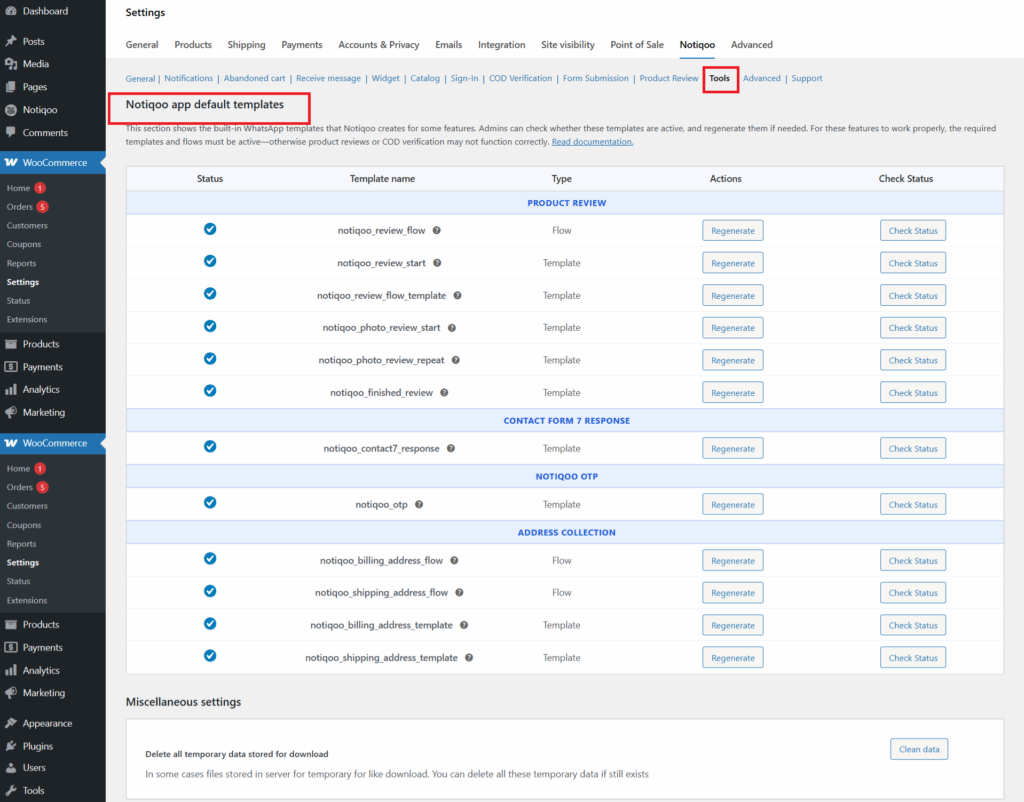
Use Regenerate to recreate a template if it’s missing or inactive, and Check Status to confirm whether it’s approved and ready to use.
Miscellaneous settings
If you want to remove temporary files stored by your site by using Notiqoo, click the Clean Data button to safely delete them. This helps keep your site clean and ensures everything works properly.
These templates are required for features like:
- Product Review reminders
- Photo Review collection
- OTP messages
- Form submission notifications
- Review flows
- COD flow and more
If required templates are inactive, those features may not work correctly.