
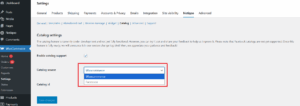
Configure product catalog source for listing products in the chat system or widgets.
Options:
Catalog Source:
- WooCommerce: Lists products directly from your WooCommerce store.
- Facebook: Will list products synced from your Facebook Catalog.
Catalog ID:
If Facebook is selected, you must enter your Facebook Catalog ID to fetch products.
Not required for WooCommerce source.
Note: Catalog support is still under development.
WhatsApp Address Collection
This option helps you collect customer billing and shipping addresses directly through WhatsApp after a catalog purchase.
How it works
When this setting is enabled, and a customer places an order via WhatsApp Catalog, Notiqoo automatically creates WhatsApp flows and message templates. The customer is guided step-by-step on WhatsApp to enter their address details

For physical products, it collects both shipping and billing addresses, and if they are different, both are saved; for virtual products, only the billing address is collected. All collected address details are automatically attached to the order details page, helping you process orders faster without manual follow-ups or errors.
📺 Watch the video tutorial to learn how to set up