
Reach thousands of customers with personalized WhatsApp messages in just a few clicks. Whether you’re announcing a new product, sharing a seasonal offer, or sending important store updates, Notiqoo makes it easy to create and send professional WhatsApp broadcast campaigns directly from your WooCommerce store.You can send broadcasts to existing customer groups or upload your own contact list using a CSV file. Messages can also include dynamic variables, allowing every customer to receive a personalized message without creating separate templates.
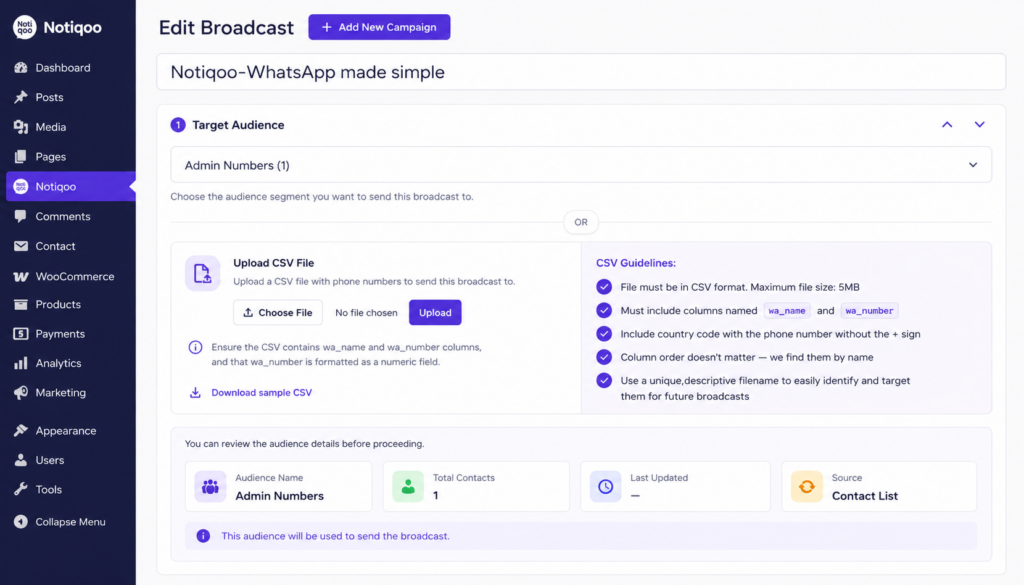
Create Your Broadcast Campaign
Creating a broadcast campaign is simple. Give your campaign a recognizable name, choose who should receive your message, select a WhatsApp template, preview the message, and send it immediately or schedule it for a later date.
Choose Your Audience
Notiqoo provides two simple ways to select recipients.
Use an Existing Audience
If you already have customer segments inside Notiqoo, simply choose the audience you want to target. This is the quickest way to send messages to your WooCommerce customers without importing any files.
Upload a CSV File
If your contacts are stored outside WooCommerce, you can upload them using a CSV file. Your CSV file should contain the following columns:
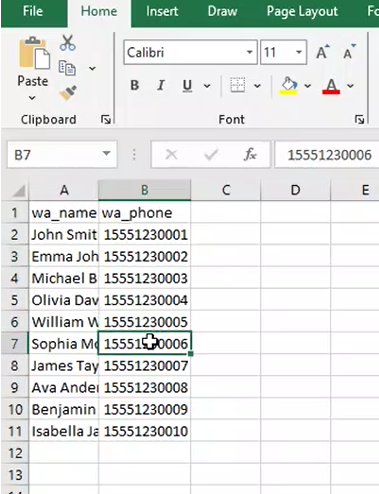
CSV Requirements to ensure successful delivery:
- Save the file in CSV (.csv) format.
- Maximum file size is 5 MB.
- Include the columns wa_name and wa_number.
- Enter the complete phone number with the country code.
- Do not include the “+” symbol, spaces, brackets, or dashes.
- The order of the columns does not matter as long as the column names are correct.
The wa_number column must be stored as a numeric value.
Format the Phone Number Column in Excel
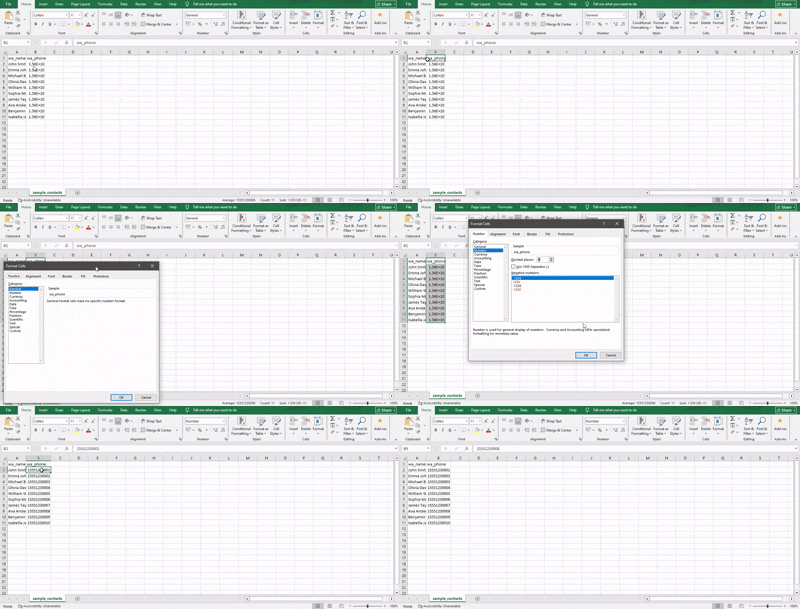
Before saving your contact list as a CSV, convert the wa_number column to the Number format.
Why is this required?
Phone numbers that include a + symbol (for example, +919876543210) are often treated as text by Excel. When you change the column to Number, Excel removes the + symbol and stores the phone number as a numeric value (for example, 919876543210). This is the recommended format for importing contacts into Notiqoo Broadcast Messaging and helps ensure the phone numbers are processed correctly during the upload.
How to Convert the Phone Number Column to Number Format
- Open your Excel file.
- Select the entire wa_number column.
- Right-click and choose Format Cells.
- Select Number.
- Set Decimal Places to 0.
- Click OK.
- Save the file as CSV (Comma delimited) (*.csv) before uploading.
Developer Note: The wa_number column must contain only numeric values (country code included) without the + symbol or any formatting characters. Non-numeric values may prevent successful processing or delivery.
Choose Template for Broadcast Messaging
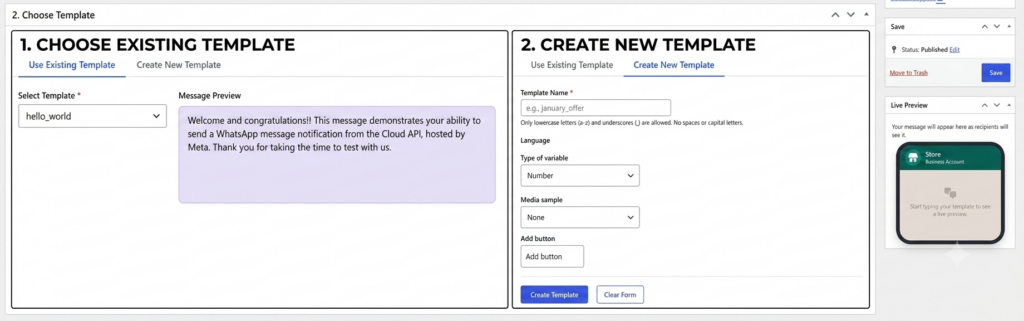
Use Existing WhatsApp Template
Choose an approved WhatsApp template for your campaign. The preview updates automatically so you can see exactly how your message will appear before sending it. Templates support variables such as customer name, making every message feel personal while sending only one campaign.
Create a WhatsApp Template
Every broadcast campaign requires an approved WhatsApp message template. If you don’t already have one, you can create a new template directly from the Broadcast Campaign page without leaving the workflow.A template defines the message that will be sent to your recipients. You can include text, media, buttons, and dynamic variables to personalize the message for each customer. After creating the template, submit it for approval. Once approved, it will be available for use in your broadcast campaigns.
Note: Newly created WhatsApp templates cannot be used for Broadcast Campaigns until they have been approved by Meta. Template approval is typically completed within 2 hours, although the review time may vary depending on Meta’s review process. Once approved, the template will automatically become available for your broadcast campaigns.
Schedule or Send Immediately
You can choose to:
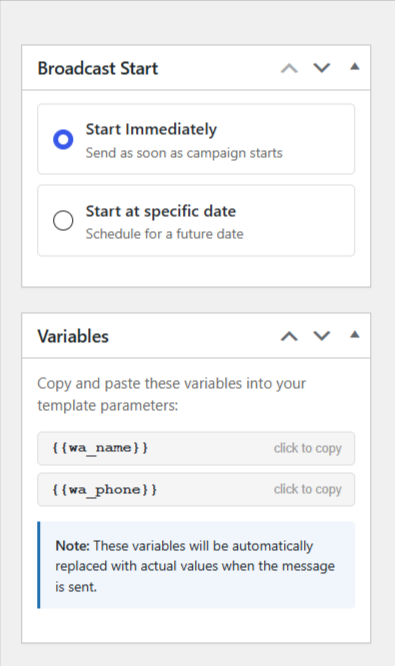
Send Immediately to start the campaign as soon as it is submitted. Schedule the campaign for a specific date and time to reach customers at the most appropriate moment.This is useful for product launches, festive promotions, flash sales, reminders, and other time-sensitive announcements.
Start and Manage Your Broadcast Campaigns
After creating a broadcast campaign, navigate to Notiqoo → Broadcasts to manage and launch it. Each campaign displays a Start button, which begins sending messages either immediately or at the scheduled time, based on the option you selected during campaign creation. The Start button is available only when your selected WhatsApp template has an Approved status. If the template is still pending or rejected, you must wait until it is approved before you can start the campaign.
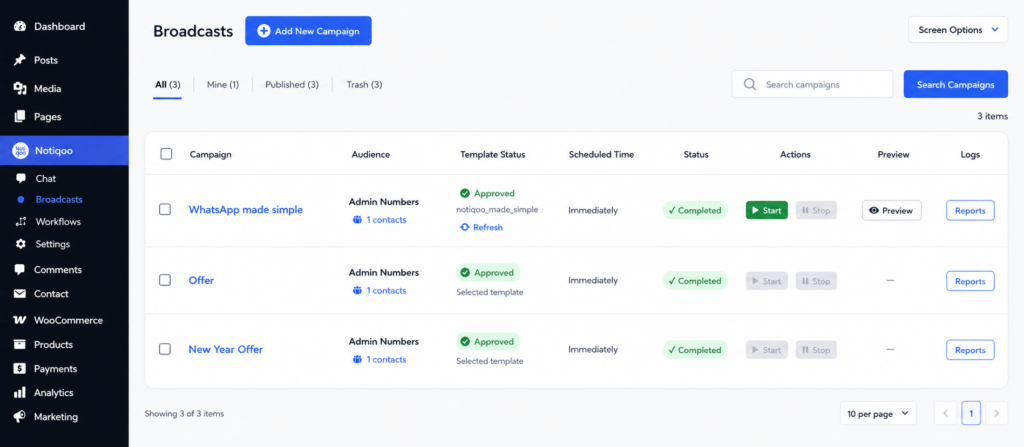
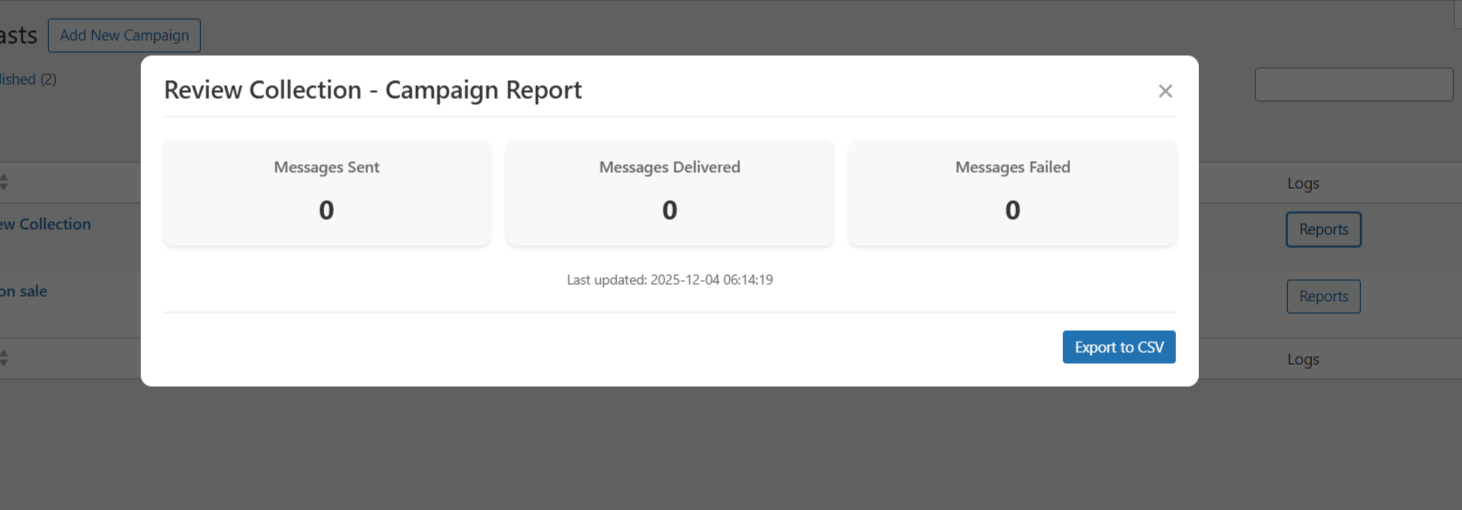
You can monitor the progress of each broadcast campaign by clicking the Reports button. The report provides detailed delivery insights, including the number of Sent, Delivered, Read, and Failed messages, helping you track your campaign’s performance in real time. If you need to analyze or keep a record of the results, you can also download the report for future reference.
Troubleshooting CSV Uploads
If contacts are not imported successfully, verify the following:
- The file is saved as a .csv file.
- The required columns are named wa_name and wa_number.
- Phone numbers contain only digits.
- Country codes are included.
- The file size does not exceed 5 MB.
- The CSV is encoded using UTF-8 for the best compatibility.